




%20(75).png)


.svg)



Starbucks just gave its baristas a raise they might not feel.
In July 2026 the company rolled out performance bonuses worth up to $1,200 a year, on top of a benefits package it values at more than $30 an hour: healthcare, Bean Stock, full upfront college tuition, 18 weeks of paid parental leave, and mental health support, all at 20 hours a week.
Now every partner has to understand what that adds up to. A benefit an employee can't see the value of is a benefit they don't use, and money the company spent for nothing.
That's the real job here. Not broadcasting an enrollment deadline, but showing each person the full value of what they're paid. Most benefits communication software does the first job well and the second one barely.
This list covers both, and it's honest about which tool does which.
Where benefits communication usually breaks down
Three failure modes show up again and again.
Reach without comprehension. Broadcast tools get the message seen. They don't make the value understood, and a seen message that isn't understood still ends in a benefit that goes unused.
Benefits data stranded from comp data. Admin platforms show enrollment and elections. They rarely show salary, bonus, and equity in the same view, so employees never see the whole number.
Statements that aren't defensible. When a rewards statement is assembled by hand from separate sources, no one can prove the figures are right. Under 2026 pay transparency rules, that gap is a risk, not just an inconvenience.
Comprehension is the part that decides whether people stay. Broadcasting alone doesn't touch it.
Best Benefit Communication Software Solutions: At a Glance
Verified G2 and Capterra ratings sit in each tool's own section below.
The 5 best employee benefits communication software tools
1. Compport
Best for: Total rewards communication built on comp data you can defend.
Most tools on this list either broadcast benefits messages or generate a statement from whatever data you hand them. Compport works the other way around. It runs merit, bonus, equity, and pay equity in one system, so the statements it produces reflect numbers that already passed through structured, approved workflows. Its total rewards statements show employees the full value of salary, bonuses, long-term incentives, rewards, and key benefits
What it covers
- Personalized total rewards statements with a full breakdown of salary, bonus, LTI, and benefits
- User-driven statement design, so you can add pages for variable pay or organize the view around your rewards philosophy
- Employee self-service portal for ongoing access, not just an annual PDF
- Multi-country and multi-currency support for global rewards teams
- Statements drawn from validated comp data, not manually assembled from separate files
Pros
- Statements are defensible because the data behind them was already validated in-platform
- Genuine personalization and multi-country handling for complex, global structures
- One system for planning and communication, so there's no export-and-rebuild step
Cons
- Newer brand with a smaller review base than legacy suites.
2. Decusoft
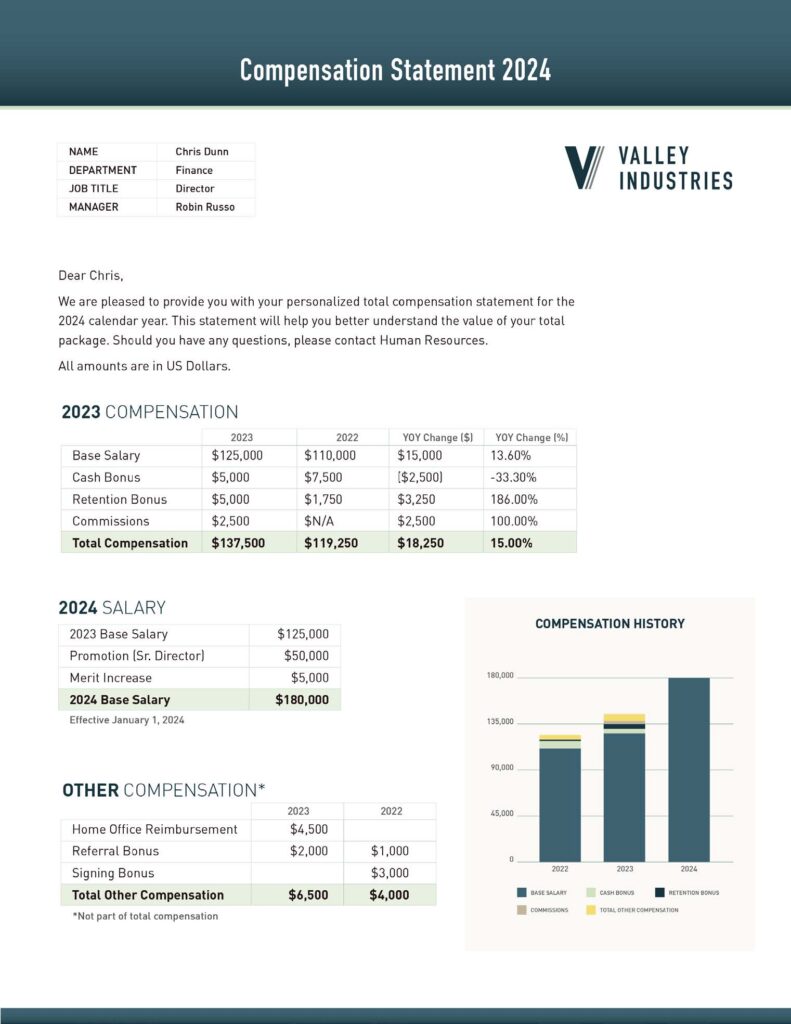
Decusoft is the closest tool here to Compport's approach. Compose is a compensation platform whose employee communication feature auto-generates total rewards statements and communication letters covering salary, incentives, and benefits (Decusoft). The statement is a byproduct of the comp system, not a separate design exercise. It's a strong fit for US comp teams that want configurable, automated statements.
What it covers
- Automated total rewards statements and employee communication letters
- Full breakdown including salary, incentives, equity, healthcare, retirement, deferred compensation, and lifestyle benefits
- No-code configuration, run it yourself or full-service
- Multi-currency support and more than a dozen native translations
- Rich employee profiles with pay and rewards history
Pros
- Statements generated straight from comp data, with deep configurability for complex plans
- Strong implementation and support reputation on Capterra
Cons
- G2 reviewers note calculation processing can be slow, and kicking off a calculation recalculates all formula-driven fields, which can overwrite prior manual entries (G2).
- Like Compport, it's a comp-team tool, not a broadcast or open-enrollment platform.
Integrations: HRIS integration plus SFTP uploads, with data imported into statements from other systems.
3. Workday
G2 (Workday Benefits): 4.2/5
If your org already runs on Workday, its Benefits module handles enrollment and benefits comms inside the same system your people already log into. Enrollment planning, third-party carrier integration, self-service portal, and total compensation statements are all in-platform (G2). The pull is consolidation, not depth of rewards communication.
What it covers
- Benefits record management and enrollment planning
- Third-party carrier integration
- Total compensation statements and a self-service portal
- Regulatory compliance, benefits dashboards, mobile access
Pros
- Strong eligibility configuration for complex, multi-population benefit plans
- Step-by-step enrollment guidance employees find clear
- One system if you're already committed to Workday
Cons
- G2 reviewers report Workday Benefits can be hard to navigate, with users struggling to locate information without excessive clicking (G2).
- Its statements are functional, not a personalized total rewards experience. Broader Workday reviews cite a learning curve that needs training.
Integrations: native across the Workday suite, plus carrier and third-party connections.
4. ADP Benefits
Reviewed on Gartner Peer Insights
ADP Benefits sits inside ADP's benefits administration and payroll stack. Its communication strength is context: reminders and messages tied to enrollment status, eligibility, and life events, using the same data that runs administration. If your benefits already live in ADP, event-triggered comms run close to the source.
What it covers
- Enrollment, eligibility management, and compliance tracking, integrated with payroll and HR systems
- Support for health, dental, vision, life, and retirement plans
- Automated reporting and tracking
Pros
- Comms triggered by enrollment and life events, tied to admin data
- Stable and reliable for records, payroll, and benefits at scale
Cons
- Gartner Peer Insights reviewers flag cost as higher than other platforms, and navigation that requires clicking through several pages to reach what you need (Gartner Peer Insights).
- Communication is scoped to the admin context. It isn't built to show the full pay-plus-benefits value a total rewards statement does.
Integrations: native to ADP payroll and HR, with carrier connections.
5. SnapComms
G2: 4.7/5
SnapComms is the pure broadcast tool on this list, and it's the best at that job. An Everbridge company, it reaches employees through desktop alerts, tickers, screensavers, mobile, surveys, and newsletters, bypassing email (G2). For enrollment reminders that have to reach deskless and distributed staff, nothing here cuts through like it.
What it covers
- Multi-channel broadcast: desktop alerts, scrolling tickers, lock-screen and screensaver messages, mobile, digital signage
- Surveys, newsletters, targeted messaging with scheduling and read tracking
- Reach to deskless and distributed workforces
Pros
- Strong cut-through and reach across devices, with reviewers praising ease of use
- Fast setup and responsive support on G2
Cons
- Capterra reviewers note success depends heavily on adoption, training, and culture change, not the software itself (Capterra).
- It broadcasts information. It doesn't personalize individual benefits value or produce total rewards statements, so pair it with a statement tool for the comprehension job.
Integrations: Active Directory for targeting, with multi-channel delivery across devices.
How to choose the right employee benefits communication software
Three questions split the field.
Is your job to make sure a message gets seen? SnapComms is built for broadcast reach, especially to deskless and frontline staff who never open the email.
Is your benefits data already in ADP or Workday, and you want comms triggered by enrollment or life events? Then ADP Benefits or Workday keeps communication close to the admin data, no second system to sync.
Is your job to show each employee the full value of pay plus benefits, in a way you can defend? That's Compport or Decusoft. Choose Compport for multi-country, multi-currency statements built on validated comp data. Choose Decusoft if you're a US comp team that wants configurable, automated statements and letters.
Most teams need more than one. The common pairing: a broadcast tool for reach, and a total rewards statement tool for comprehension.
%20(98).png)
%20(97).png)
%20(96).png)