






Agentic AI in comp usually stalls on readiness, not on the tool.
Seven areas decide whether you're ready: data, policies, integrations, workflows, governance, security and approvals.
You don't need all seven perfect to start. One use case, full controls and a named owner is enough for a first pilot.
Use the 35-point checklist in this article to score your comp function and find your next step.
Gartner predicts that over 40% of agentic AI projects will be canceled by the end of 2027 due to rising costs, unclear business value, or weak risk controls. In compensation, adoption is still in its early stages.
In Mercer's February 2026 survey of US employers, more than half were exploring AI for compensation planning, design, or management, but only 16% were using it.
The gap is rarely the tool. It is whether the data, rules, systems, and approvals underneath are ready for one. And waiting has its own risk. When a governed option isn't there, comp data tends to end up pasted into general AI tools that nobody controls.
There is an upside, too. Compensation is one of the most analytical functions in HR and one of the least digitized, so there is less to unlearn. This guide covers what agentic AI needs from your comp function, then gives you a checklist to score where you stand.
Why compensation is a harder test for agentic AI
On paper, compensation is a good fit for agentic AI. It is rule-driven, with existing merit matrices, pay bands, eligibility rules, and budgets. It runs on structured data. And it repeats the same decision logic across thousands of employees every cycle.
What makes it harder is what is at stake:
- The data is among the most sensitive in the company. Salaries, ratings, and demographic data need tight access control.
- Every output can change someone's pay. A recommendation has to be defensible to a manager, an employee, an auditor, or a regulator, not just quick.
- The rules are tightening. Under GDPR Article 22, people have protections against decisions with significant effects made solely by automated means. The EU AI Act treats AI used in employment decisions as high-risk. And pay transparency laws in the US and EU mean more pay decisions will be visible and subject to scrutiny.
So the question isn't whether AI can answer a comp question. It's whether your comp function can stand behind the answer.
You don't need to be fully ready to start
Readiness isn't a line you cross once. Most teams start with one use case, a small pilot group, and full controls from day one, then widen it as trust builds. What matters is knowing where you are and what to fix next. The checklist later in this article tells you which phase you're in.
What to get right before AI touches a pay decision
Seven areas decide whether agentic AI will hold up in your comp function.
1. Clean, consistent data
AI is only as reliable as the data it's built on. If job titles mean different things across business units, or ratings are stored in three different ways, every answer built on them is shaky.
What ready looks like
- Employee data such as grades, titles, tenure, and location is consistent across systems
- Two to three years of comp history you can query
- Performance ratings stored in one structured format
- A documented job architecture, with levels, families, and grades
- Current market data, licensed and mapped to your roles
How CompportIQ handles it
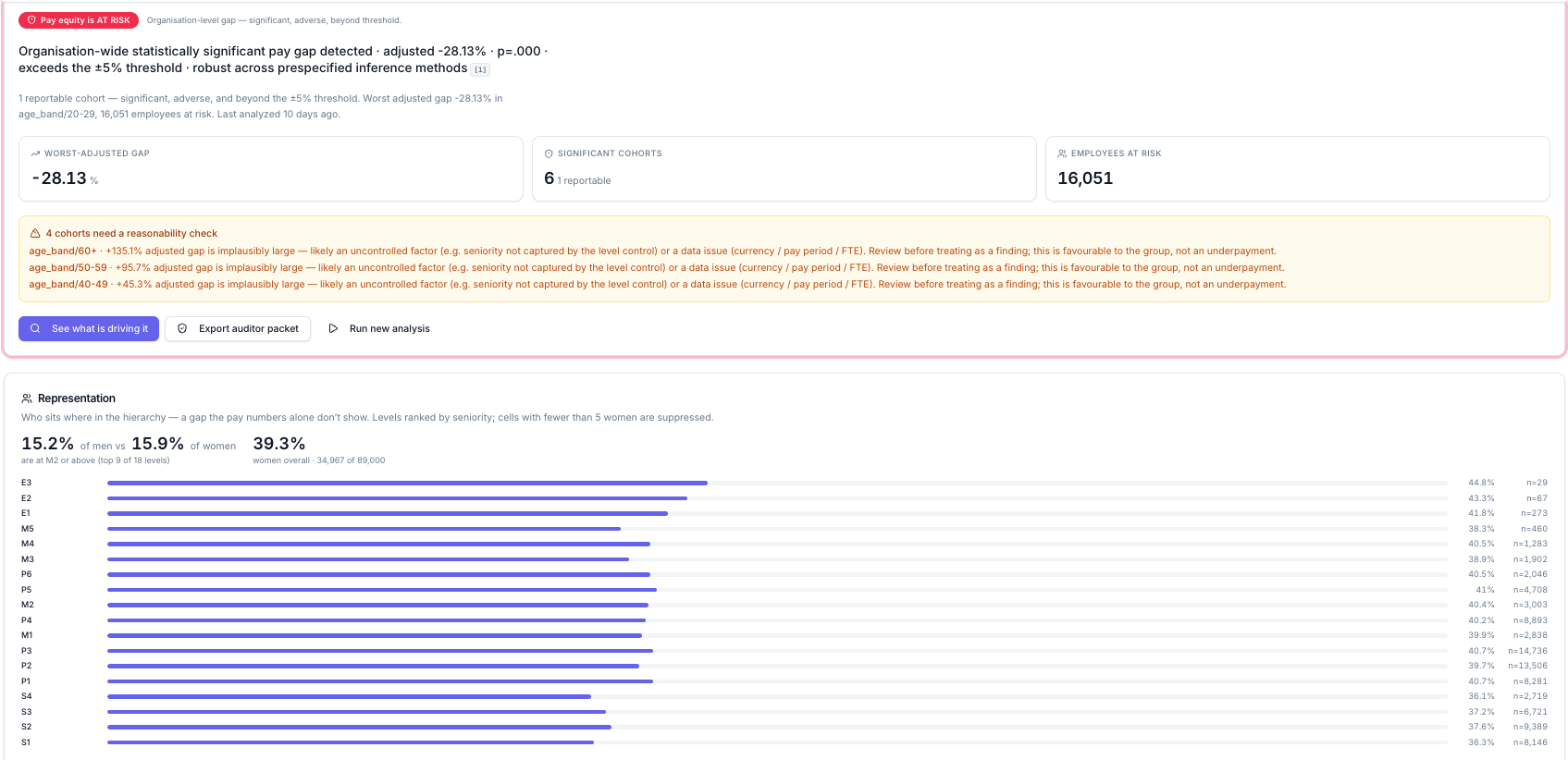
CompportIQ works on your live Compport data, so it uses the same records your cycle runs on. Market data used for benchmarking is licensed or loaded by you and kept separate from employee data. Heavy calculations, such as pay equity regressions, run inside Compport, and only the minimum context needed to answer a question reaches the language model. When a result looks implausible, such as a pay gap far larger than it should be, CompportIQ flags it for a reasonability check as a likely data issue instead of reporting it as a finding.
2. Written pay rules
An AI tool can only follow rules that exist outside people's heads. If merit guidance lives in a manager email and eligibility lives in a spreadsheet, the AI has nothing solid to work with.
What ready looks like
- A written pay philosophy
- Merit guidelines, matrices and eligibility rules defined
- Bonus and incentive rules documented
- Clear override authority, so everyone knows who can change a recommendation
- A written policy on how AI is used in pay decisions, agreed before go-live, not after the first dispute
How CompportIQ handles it
CompportIQ reasons inside the bands, policies, eligibility rules and approval chains already set up in Compport. Its recommendations are driven by policy variables such as performance, band position, market reference and budget. Protected attributes are not inputs to recommendation logic.
3. Systems that talk to each other
If employee data must be exported, cleaned, and reimported before every analysis, the AI is always working with yesterday's numbers.
What ready looks like
- Your HRIS feeds employee data into comp automatically
- Mid-cycle changes such as new hires, role changes, and exits flow through
- Approved changes reach payroll without rekeying
- Single sign-on in place for comp tools
- Market data loaded on a set schedule
How CompportIQ handles it
Compport connects to your HRIS through native integrations, using standard API, SSO, and integration flows. CompportIQ works on that synced data, and its recommendations land in the Compport workflow where pay decisions are made.
4. Work that runs in one place
Agentic AI helps most when its recommendation appears at the point of decision-making. If your cycle runs across spreadsheets, email, and a separate approval tool, there's nowhere for it to land.
What ready looks like
- Comp cycles run in a system, not spreadsheets
- Approval chains set up in that system
- Managers and HRBPs working in the same workflow
- One first use case chosen
- A baseline, such as cycle time or error rate, to measure against
How CompportIQ handles it
CompportIQ is built into Compport's compensation workflows, so insights connect directly to existing processes and approvals. You describe the problem in plain language, CompportIQ picks the right agents and data, the calculation engines do the math and the AI explains the result.
5. Clear ownership and oversight
Governance is what lets you answer "why did the system recommend this?" months later, when an employee or a regulator asks. It's also the area most teams leave until after something goes wrong.
What ready looks like
- A named owner accountable for each AI use case
- Recommendations that can be explained for an individual employee
- A documented pay equity method, with declared control factors
- Overrides and decisions logged
- A regular review of AI-assisted decisions
How CompportIQ handles it
CompportIQ keeps AI and calculation apart. Proven, tested engines produce every number, and the language model only understands the question and explains the result, so it can't invent a figure. Each agent is purpose-built and works only through approved tools, within defined boundaries. Every recommendation shows the factors, rules and method behind it, and pay equity analysis uses documented statistical methods an outside expert can reproduce.
Every conversation, tool call, data scope and result is logged with the user and timestamp. If an answer looks wrong, it can be traced to the data, the calculation or the wording, then fixed. And CompportIQ is ISO 42001 certified, so its AI management system is independently audited rather than self-asserted.
6. Security your IT and legal teams will sign off
Before any AI touches comp data, IT, legal, and, in many countries, works councils will want answers. The easier those answers are, the faster you can start.
What ready looks like
- Access to comp data is role-based and mirrors your organization
- Your vendor contract says your data will not train any model
- Your data is isolated from other customers' data
- Vendor certifications checked
- IT, legal, and works councils have reviewed how AI will be used
How CompportIQ handles it
CompportIQ is role-aware. Every agent runs with the permissions of the person asking, enforced in the data path, so an HRBP sees their client group, a comp leader sees the organization, and a manager sees their team. Customer data is never used to train AI models, and that commitment is in the contract. Each customer's data is kept separate and is never shared across organizations, and Compport employees have no standing access to customer data.
7. A person approving every pay decision
Agentic AI can analyze, model, and draft. It shouldn't be the one that decides someone's pay.
What ready looks like
- Every pay change needs a named human approver
- Approval thresholds defined
- Managers can override a recommendation, and the override is recorded
- An escalation path for exceptions
- Managers who can explain to an employee why a decision was made
How CompportIQ handles it
CompportIQ recommends, and people decide. Today it analyzes, recommends, and prepares the work, and every final decision goes through an authorized person in your existing approval process. Because no decision is made solely by automated means, there is meaningful human involvement by design, and every step is recorded in a full audit trail.
The agentic AI readiness checklist for compensation teams
Tick everything that's true for your comp function today. There are five checks in each of the seven areas, and your score updates as you go.
What your score means
0 to 14: Getting started
You're in the diagnose phase. Write down the problem you want AI to solve, and what success would look like, before you look at any tool. Then fix the basics in your weakest areas, usually data and written rules.
Watch out for defining success as "implementing AI" instead of a measurable outcome.
15 to 27: Building the foundations
You're in the evaluate phase. Close the gaps the checklist flagged, then test tools on your own data rather than a demo dataset. Ask every vendor where the numbers come from, who can see what, and who approves the output.
Watch out for choosing the best demo over the strongest fit.
28 to 35: Ready for a first pilot
You're ready to pilot. Pick one frequent, low-risk use case, set a baseline, and run it for a full cycle with a named owner.
Watch out for scaling adoption faster than governance. Add use cases one at a time, with oversight in place for each.
Start small, and keep a person in charge
Agentic AI in compensation succeeds or fails on what's underneath it: clean data, written rules, connected systems, clear ownership, security your teams trust, and a person approving every pay decision. You don't need all seven perfect to begin. You need to know where you stand, fix what matters most, and start with one use case you can measure.
That's how CompportIQ is built to work. It runs on your live comp data, inside your rules and approvals, with every number calculated, every recommendation explained, and every decision made by a person. When the reasoning is there, the result is comp you can defend.

FAQs
What does agentic AI readiness mean for a compensation team?
It means having the data, rules, systems, and controls in place for AI to make real pay decisions safely. That covers seven areas: data, policies, integrations, workflows, governance, security, and approvals. Most teams don't need all seven perfect to start a first pilot.
What data do you need before using AI in compensation?
Consistent employee data across systems, two to three years of comp history, structured performance ratings, a documented job architecture, and current, licensed market data. If several of these are missing, fix them before choosing a tool.
Do you need to replace your HRIS to use agentic AI in compensation?
No. Compport connects to HRIS platforms such as Workday, SAP SuccessFactors, Oracle HCM, ADP, and UKG through native integrations, using standard API, SSO, and integration flows. CompportIQ then works on that synced data.
Can AI make compensation decisions on its own?
It shouldn't. With CompportIQ, AI analyzes, recommends, and prepares the work, but every final pay decision goes through an authorized person in the existing approval process, and every step is logged.
How do you keep compensation data secure when using AI?
Look for role-based access enforced at the data layer, a contractual commitment that your data won't be used to train any model, tenant isolation, and independent certifications. CompportIQ runs with each user's permissions, never trains on customer data, and keeps each customer's data separate.
Which certifications should an AI compensation vendor have?
Look for security and AI-specific certifications, plus compliance with the privacy laws that apply to you. CompportIQ is certified and compliant with GDPR (EU data protection), CCPA (California privacy), ISO 27001 (information security), ISO 42001 (AI management systems), SOC 2 (security controls) and DPDP (India's data protection law).
How long does it take to get ready for agentic AI in compensation?
It depends on where you start. A typical path runs from diagnosing the problem in the first few weeks, to evaluating tools, to a pilot over two to four months, then scaling over the rest of the year as governance keeps pace.