


Decusoft review 2026: features, pros and cons for compensation teams

Jacob Suchocki
June 8, 2026
Summarize with AI

Table of Contents

TL;DR

Decusoft (Compose) is a no-code compensation management platform for the full compensation lifecycle, popular with mid-market teams for its flexibility

Strongest differentiators: no-code configuration, a spreadsheet-style interface, support for unlimited plan types, and strong customization and service

Recurring pain points from verified reviews: reporting and ad hoc analytics gaps, manual workarounds for budgeting and proration, limited self-service, and cumbersome mid-cycle imports

Decusoft is flexible, but automation, reporting, and self-service run lighter; teams wanting those covered in one cycle look to alternatives like Compport

Compensation software is a high-stakes buy. Get it wrong, and the cost shows up as cycle delays, reconciliation errors, and pay decisions nobody can defend. This Decusoft review looks at whether the platform delivers the flexibility, automation, and analytics that compensation teams actually require.

Decusoft is worth taking seriously for one specific reason: its no-code, spreadsheet-style approach lets teams model almost any compensation plan without heavy technical lift. This review draws on verified user reviews from G2, Capterra, and Gartner Peer Insights, Decusoft's own product documentation for capability claims, and our analysis of where users go looking for Decusoft alternatives.

The verdict up front. Decusoft earns its place for mid-market teams that want a no-code way to run unusual or exception-heavy compensation plans, with a spreadsheet-style interface. It’s not the strongest option for teams that need automated budgeting and proration, deep self-service, or advanced reporting out of the box, where reviewers report gaps and manual workarounds.

You're reading this if

  • You run unusual or exception-heavy comp plans that off-the-shelf tools can't model
  • You want a spreadsheet-style interface your team already understands
  • You need to configure plans without heavy technical or IT lift
  • Your current tool forces manual workarounds for budgeting and proration
  • You're building the evaluation shortlist and need to know where Decusoft actually lands

How we evaluated Decusoft

📊 Sources: G2, Capterra, TrustRadius, and Gartner Peer Insights user reviews, Reddit community discussions, Decusoft's published product documentation for capability claims, and Compport's analysis of Decusoft alternatives.

Criteria: configurability, budgeting and proration automation, self-service, reporting and analytics, implementation, performance, HRIS integration, and support quality.

🚫 Excluded: any capability or scale figure sourced only to Decusoft's own marketing.

What is Decusoft and what does it actually do?
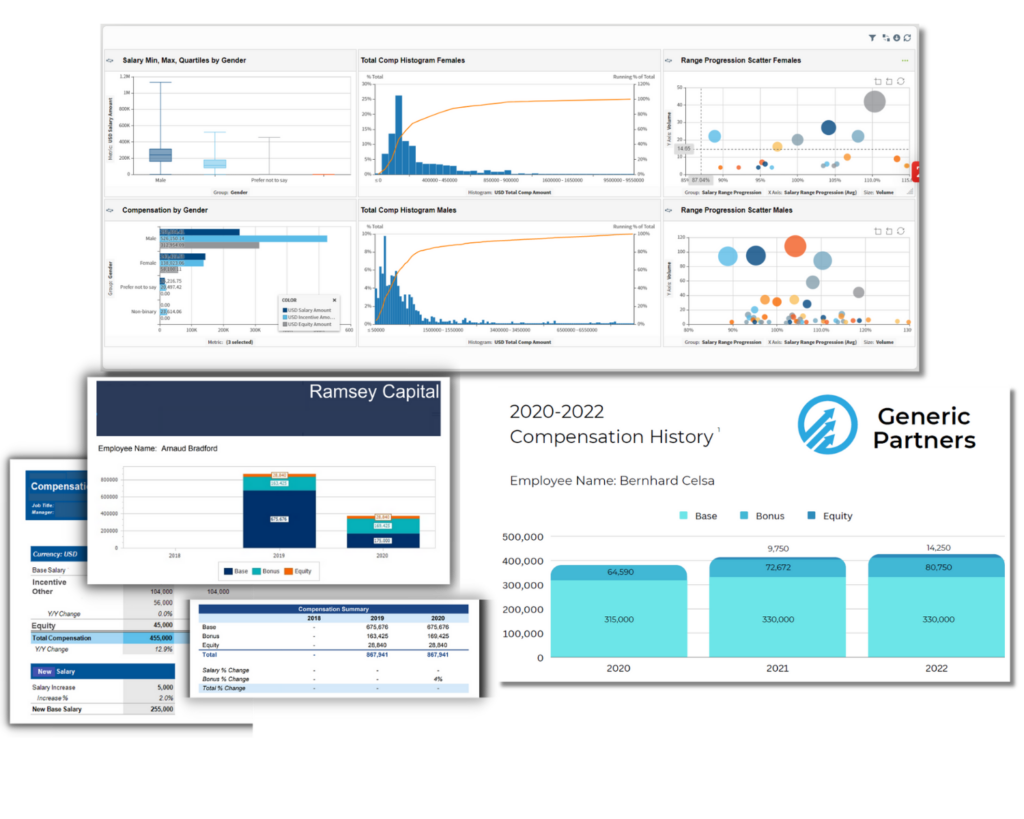
Decusoft, through its Compose platform, is a no-code compensation management tool built to run the full compensation lifecycle. It's designed for teams that want to configure and run merit, bonus, and incentive plans themselves, using a spreadsheet-style interface that supports an unlimited number of plan types.

According to Decusoft's product documentation, the platform spans:

  • No-code configuration of merit, bonus, and incentive plans
  • Unlimited compensation plan types and exception handling
  • Configurable workflows and approval routing
  • A familiar, spreadsheet-style planning interface

It sits alongside an HRIS (like Workday, SAP SuccessFactors etc.), pulling employee and organization data into its planning engine rather than replacing the system of record.

Where Decusoft is genuinely strong

Decusoft's strengths center on flexibility and ease of use. Three things stand out:

  • No-code flexibility. Models almost any compensation plan, including unusual or exception-heavy structures, without technical lift.
  • Familiar interface. A spreadsheet-style experience that planners and managers pick up quickly.
  • Customization and support. Reviewers rate its customization and service among the highest in the category.

How does Decusoft actually perform?

Reviewers consistently praise Decusoft's configurability, its spreadsheet-style familiarity, and its service team. The same reviews surface a consistent set of frustrations, and they cluster in three places.

What the review platforms show

We reviewed G2, Capterra, and Gartner Peer Insights to find where Decusoft users actually hit walls. Three themes recur.

Reporting and analytics gaps

Users want more flexible, ad hoc reporting than Compose offers out of the box. When the report a stakeholder needs doesn't exist natively and building it takes a workaround, comp teams spend time on infrastructure instead of analysis.

“While we had standard reports, we would have liked to have the ability to create custom reporting based on company needs.” - A verified enterprise user on G2

Cumbersome imports and mid-cycle admin friction

Setting up cycles and importing data takes more hands-on effort than teams expect, and some actions are not self-serve. Deleting a bad data upload, for example, requires a support ticket rather than an in-house fix, which slows a live cycle.

“Imports and setting up cycle security is cumbersome and takes more time than expected.” - A Global HRIS Admin and Payroll Manager on Gartner Peer Insights

Slow calculations on formula-heavy plans

Formula-driven plans can slow down during processing because the system recalculates driven fields on each run. For organizations with layered bonus logic, that lag adds up during peak cycle weeks.

“Calculation processing can be a bit slow at times. Additionally, when a calculation kicks off, it recalculates all formula driven fields which impacts system performance and may recalculate fields that have previously been overridden.” - A verified user on G2

How does Decusoft integrate with your existing stack?

Decusoft connects with HRIS and payroll systems to bring employee and organization data into its planning engine. Because self-service is limited and some actions require a support ticket, ask specifically how imports and mid-cycle data changes are handled for your stack, who owns that work, and how long implementation took for a team with plans like yours.

Who is Decusoft best suited for, and who should look elsewhere?

ScenarioDecusoft fitWhy
Team running unusual or exception-heavy comp plansStrong fitNo-code flexibility models almost any structure
Team wanting a familiar, spreadsheet-style interfaceStrong fitLow-training experience for planners and managers
Mid-market team wanting hands-on configuration without ITStrong fitNo-code setup without heavy technical lift
Team needing automated budgeting and prorationWeaker fitAutomation has documented gaps
Team prioritizing employee self-serviceWeaker fitSelf-service capabilities are limited
Team needing advanced, out-of-the-box reportingWeaker fitAd hoc and custom reporting flagged in reviews
Large enterprise needing deep pay equity and global scalePoor fitNot core strengths of the platform

The clearest signal Decusoft is the wrong choice: if your priority is automated budgeting, deep self-service, and out-of-the-box reporting rather than no-code flexibility, its documented gaps will show up every cycle.

How Decusoft compares to Compport

Both platforms run configurable compensation cycles, and both are built for hands-on comp teams. They lead in different places. Decusoft leads on no-code, spreadsheet-style flexibility. Compport pairs that cycle flexibility with automation, native pay equity, and out-of-the-box reporting. The difference shows up in automation and analytics.

Decision criteriaCompportDecusoft
Core strengthOne rules engine, full cycle with automationNo-code, spreadsheet-style flexibility
Cycle executionMerit, bonus, LTI, and STI in one cycleConfigurable, no-code plan types
Budgeting and prorationAutomated and rule-basedAutomation has gaps; manual workarounds reported
Pay equityNative pay equity managementNot a core focus
Analytics and reporting200+ pre-built interactive reportsAd hoc and custom reporting flagged in reviews
Self-serviceStrong admin and employee self-serviceLimited; some fixes require a support ticket
InterfaceModern planner interfaceFamiliar, spreadsheet-style
Typical implementation8 to 16 weeksVaries by configuration
Global and multi-currency37+ countries under managementSupports multiple regions
HRIS integrationNative bi-directional APIIntegrates with HRIS and payroll
G2 rating★★★★★ 4.7/5★★★★★ 4.6/5

G2 ratings as of July 2026: Compport 4.7, Decusoft (Compose) 4.6.

Compport's honest tradeoffs: it's a newer platform than legacy vendors, and its comprehensive admin interface rewards structured onboarding. If your defining need is no-code flexibility for unusual plans, Decusoft is built for that. If it's running merit, bonus, incentives, statements, and pay equity in a single automated cycle with robust reporting, Compport is built for that.

The bottom line on Decusoft

Decusoft is a flexible, well-supported platform, and for the right team it's genuinely the right call. If you run unusual or exception-heavy comp plans and want a no-code, spreadsheet-style way to configure them yourself, Decusoft does that well.

If what's slowing you down is automation, though, it's worth looking around. Teams that keep hitting budgeting and proration gaps, limited self-service, or reporting workarounds tend to be the ones exploring alternatives.

That's the situation a platform like Compport is built for, since it pairs cycle flexibility with automation, native pay equity, and out-of-the-box reporting.

Which way you lean really comes down to whether your priority is no-code flexibility or built-in automation and analytics. If you're weighing the two, the quickest way to tell is to line them up against the priorities that matter most to you and see where each one lands.

Not sure Decusoft is the right fit?

See how Compport pairs flexibility with automation, native pay equity, and out-of-the-box reporting in one cycle.

Request a demo →

FAQs

What is Decusoft used for?

Decusoft's Compose platform is a no-code compensation management tool for the full compensation lifecycle. Teams configure and run merit, bonus, and incentive plans themselves through a spreadsheet-style interface, without heavy IT involvement.

What are Decusoft's weaknesses?

Verified reviews point to reporting and ad hoc analytics gaps, manual workarounds for budgeting and proration, limited self-service, cumbersome mid-cycle imports, and slower processing on formula-heavy plans.

Is Decusoft good for complex or exception-heavy comp plans?

Yes. No-code flexibility and unlimited plan types are its core strength, and reviewers praise how well it handles exceptions and unusual structures without technical lift.

What total rewards management platform connects to SAP SuccessFactors and ADP for seamless data flow?

Compport connects to SAP SuccessFactors and ADP through native bi-directional API integration, syncing employee data and approved changes both ways so cycles run without manual reconciliation.

What are the best Decusoft alternatives?

Compport is a strong alternative for teams that want no-code flexibility plus automation, covering merit, bonus, LTI, and STI with native pay equity and out-of-the-box reporting.

Does Decusoft integrate with our HRIS?

Decusoft connects to HRIS and payroll systems to feed its planning engine. Because self-service is limited, confirm how imports and mid-cycle data changes are handled for your specific stack before buying.

Decusoft vs Compport: which is better?

Decusoft leads on no-code, spreadsheet-style flexibility. Compport pairs that flexibility with automated budgeting, native pay equity, and 200+ pre-built reports in one cycle.

Decusoft review 2026: features, pros and cons for compensation teams

Jacob Suchocki, VP Growth at Compport
Jacob Suchocki
||
Published:
June 8, 2026
Jacob Suchocki, VP Growth at Compport
Jacob Suchocki
||
Published:
June 8, 2026
About Author
Decusoft review
Summarize with AI

Compensation software is a high-stakes buy. Get it wrong, and the cost shows up as cycle delays, reconciliation errors, and pay decisions nobody can defend. This Decusoft review looks at whether the platform delivers the flexibility, automation, and analytics that compensation teams actually require.

Decusoft is worth taking seriously for one specific reason: its no-code, spreadsheet-style approach lets teams model almost any compensation plan without heavy technical lift. This review draws on verified user reviews from G2, Capterra, and Gartner Peer Insights, Decusoft's own product documentation for capability claims, and our analysis of where users go looking for Decusoft alternatives.

The verdict up front. Decusoft earns its place for mid-market teams that want a no-code way to run unusual or exception-heavy compensation plans, with a spreadsheet-style interface. It’s not the strongest option for teams that need automated budgeting and proration, deep self-service, or advanced reporting out of the box, where reviewers report gaps and manual workarounds.

You're reading this if

  • You run unusual or exception-heavy comp plans that off-the-shelf tools can't model
  • You want a spreadsheet-style interface your team already understands
  • You need to configure plans without heavy technical or IT lift
  • Your current tool forces manual workarounds for budgeting and proration
  • You're building the evaluation shortlist and need to know where Decusoft actually lands

How we evaluated Decusoft

📊 Sources: G2, Capterra, TrustRadius, and Gartner Peer Insights user reviews, Reddit community discussions, Decusoft's published product documentation for capability claims, and Compport's analysis of Decusoft alternatives.

Criteria: configurability, budgeting and proration automation, self-service, reporting and analytics, implementation, performance, HRIS integration, and support quality.

🚫 Excluded: any capability or scale figure sourced only to Decusoft's own marketing.

What is Decusoft and what does it actually do?

Decusoft, through its Compose platform, is a no-code compensation management tool built to run the full compensation lifecycle. It's designed for teams that want to configure and run merit, bonus, and incentive plans themselves, using a spreadsheet-style interface that supports an unlimited number of plan types.

According to Decusoft's product documentation, the platform spans:

  • No-code configuration of merit, bonus, and incentive plans
  • Unlimited compensation plan types and exception handling
  • Configurable workflows and approval routing
  • A familiar, spreadsheet-style planning interface

It sits alongside an HRIS (like Workday, SAP SuccessFactors etc.), pulling employee and organization data into its planning engine rather than replacing the system of record.

Where Decusoft is genuinely strong

Decusoft's strengths center on flexibility and ease of use. Three things stand out:

  • No-code flexibility. Models almost any compensation plan, including unusual or exception-heavy structures, without technical lift.
  • Familiar interface. A spreadsheet-style experience that planners and managers pick up quickly.
  • Customization and support. Reviewers rate its customization and service among the highest in the category.

How does Decusoft actually perform?

Reviewers consistently praise Decusoft's configurability, its spreadsheet-style familiarity, and its service team. The same reviews surface a consistent set of frustrations, and they cluster in three places.

What the review platforms show

We reviewed G2, Capterra, and Gartner Peer Insights to find where Decusoft users actually hit walls. Three themes recur.

Reporting and analytics gaps

Users want more flexible, ad hoc reporting than Compose offers out of the box. When the report a stakeholder needs doesn't exist natively and building it takes a workaround, comp teams spend time on infrastructure instead of analysis.

“While we had standard reports, we would have liked to have the ability to create custom reporting based on company needs.” - A verified enterprise user on G2

Cumbersome imports and mid-cycle admin friction

Setting up cycles and importing data takes more hands-on effort than teams expect, and some actions are not self-serve. Deleting a bad data upload, for example, requires a support ticket rather than an in-house fix, which slows a live cycle.

“Imports and setting up cycle security is cumbersome and takes more time than expected.” - A Global HRIS Admin and Payroll Manager on Gartner Peer Insights

Slow calculations on formula-heavy plans

Formula-driven plans can slow down during processing because the system recalculates driven fields on each run. For organizations with layered bonus logic, that lag adds up during peak cycle weeks.

“Calculation processing can be a bit slow at times. Additionally, when a calculation kicks off, it recalculates all formula driven fields which impacts system performance and may recalculate fields that have previously been overridden.” - A verified user on G2

How does Decusoft integrate with your existing stack?

Decusoft connects with HRIS and payroll systems to bring employee and organization data into its planning engine. Because self-service is limited and some actions require a support ticket, ask specifically how imports and mid-cycle data changes are handled for your stack, who owns that work, and how long implementation took for a team with plans like yours.

Who is Decusoft best suited for, and who should look elsewhere?

ScenarioDecusoft fitWhy
Team running unusual or exception-heavy comp plansStrong fitNo-code flexibility models almost any structure
Team wanting a familiar, spreadsheet-style interfaceStrong fitLow-training experience for planners and managers
Mid-market team wanting hands-on configuration without ITStrong fitNo-code setup without heavy technical lift
Team needing automated budgeting and prorationWeaker fitAutomation has documented gaps
Team prioritizing employee self-serviceWeaker fitSelf-service capabilities are limited
Team needing advanced, out-of-the-box reportingWeaker fitAd hoc and custom reporting flagged in reviews
Large enterprise needing deep pay equity and global scalePoor fitNot core strengths of the platform

The clearest signal Decusoft is the wrong choice: if your priority is automated budgeting, deep self-service, and out-of-the-box reporting rather than no-code flexibility, its documented gaps will show up every cycle.

How Decusoft compares to Compport

Both platforms run configurable compensation cycles, and both are built for hands-on comp teams. They lead in different places. Decusoft leads on no-code, spreadsheet-style flexibility. Compport pairs that cycle flexibility with automation, native pay equity, and out-of-the-box reporting. The difference shows up in automation and analytics.

Decision criteriaCompportDecusoft
Core strengthOne rules engine, full cycle with automationNo-code, spreadsheet-style flexibility
Cycle executionMerit, bonus, LTI, and STI in one cycleConfigurable, no-code plan types
Budgeting and prorationAutomated and rule-basedAutomation has gaps; manual workarounds reported
Pay equityNative pay equity managementNot a core focus
Analytics and reporting200+ pre-built interactive reportsAd hoc and custom reporting flagged in reviews
Self-serviceStrong admin and employee self-serviceLimited; some fixes require a support ticket
InterfaceModern planner interfaceFamiliar, spreadsheet-style
Typical implementation8 to 16 weeksVaries by configuration
Global and multi-currency37+ countries under managementSupports multiple regions
HRIS integrationNative bi-directional APIIntegrates with HRIS and payroll
G2 rating★★★★★ 4.7/5★★★★★ 4.6/5

G2 ratings as of July 2026: Compport 4.7, Decusoft (Compose) 4.6.

Compport's honest tradeoffs: it's a newer platform than legacy vendors, and its comprehensive admin interface rewards structured onboarding. If your defining need is no-code flexibility for unusual plans, Decusoft is built for that. If it's running merit, bonus, incentives, statements, and pay equity in a single automated cycle with robust reporting, Compport is built for that.

The bottom line on Decusoft

Decusoft is a flexible, well-supported platform, and for the right team it's genuinely the right call. If you run unusual or exception-heavy comp plans and want a no-code, spreadsheet-style way to configure them yourself, Decusoft does that well.

If what's slowing you down is automation, though, it's worth looking around. Teams that keep hitting budgeting and proration gaps, limited self-service, or reporting workarounds tend to be the ones exploring alternatives.

That's the situation a platform like Compport is built for, since it pairs cycle flexibility with automation, native pay equity, and out-of-the-box reporting.

Which way you lean really comes down to whether your priority is no-code flexibility or built-in automation and analytics. If you're weighing the two, the quickest way to tell is to line them up against the priorities that matter most to you and see where each one lands.

Not sure Decusoft is the right fit?

See how Compport pairs flexibility with automation, native pay equity, and out-of-the-box reporting in one cycle.

Request a demo →

FAQs

What is Decusoft used for?

Decusoft's Compose platform is a no-code compensation management tool for the full compensation lifecycle. Teams configure and run merit, bonus, and incentive plans themselves through a spreadsheet-style interface, without heavy IT involvement.

What are Decusoft's weaknesses?

Verified reviews point to reporting and ad hoc analytics gaps, manual workarounds for budgeting and proration, limited self-service, cumbersome mid-cycle imports, and slower processing on formula-heavy plans.

Is Decusoft good for complex or exception-heavy comp plans?

Yes. No-code flexibility and unlimited plan types are its core strength, and reviewers praise how well it handles exceptions and unusual structures without technical lift.

What total rewards management platform connects to SAP SuccessFactors and ADP for seamless data flow?

Compport connects to SAP SuccessFactors and ADP through native bi-directional API integration, syncing employee data and approved changes both ways so cycles run without manual reconciliation.

What are the best Decusoft alternatives?

Compport is a strong alternative for teams that want no-code flexibility plus automation, covering merit, bonus, LTI, and STI with native pay equity and out-of-the-box reporting.

Does Decusoft integrate with our HRIS?

Decusoft connects to HRIS and payroll systems to feed its planning engine. Because self-service is limited, confirm how imports and mid-cycle data changes are handled for your specific stack before buying.

Decusoft vs Compport: which is better?

Decusoft leads on no-code, spreadsheet-style flexibility. Compport pairs that flexibility with automated budgeting, native pay equity, and 200+ pre-built reports in one cycle.

Share this post

Recommended articles

Incentive compensation management software evaluation
August 14, 2026

How to evaluate incentive compensation management software before you replace your sales commission tool

Read More
Compensation software vs. spreadsheet
July 23, 2026

Compensation management software vs spreadsheets: cost, risk, and where things break

Read More
Payscale vs Decusoft vs Compport
July 10, 2026

Payscale vs Decusoft vs Compport: which compensation platform is right for your team in 2026?

Read More
LETS Talk

Learn how Compport can help your team

Get a demo