




%2520(57).png)


.svg)



Comp ROI comes from three buckets: merit cycle efficiency, reduced queries and grievances, and lower attrition. Most companies track none of these.
Attribution is the hard part, not the math. A good model only claims what it can defend.
The return builds over years, not months. Year 1 always looks small.
Revenue impact and legal risk savings are real, but they belong in the footnotes.
Picture your C&B team three weeks into merit cycle. Bouncing between spreadsheet versions, fielding manager questions, chasing approvals, fixing formula errors nobody caught until the output was already shared.
Nobody called it a cost. But it is one. And most companies haven't added it up.
This article names the three places where compensation software creates measurable value, explains how to build an honest ROI model around them, and flags what belongs in the footnotes, not the headline number.
Why is it hard to measure the ROI of compensation planning software?
The difficulty with compensation software ROI is largely the attribution. Compensation touches engagement, retention, fairness perceptions, and manager productivity all at once. A credible model doesn't try to claim all of it. It isolates what's measurable and leaves the rest in the footnotes.
Three things get in the way of a clean calculation:
Some payoffs don't show up on invoices
Gartner research found that the main driver of whether employees perceive their pay as fair isn't the number itself. It's whether they trust how it was decided. Software that brings structure and consistency to compensation decisions builds that trust. That shows up in engagement scores and exit interviews, not invoices.
The return builds over years, not months
Technology investments typically show peak ROI somewhere between years two and four. Year 1 is implementation. Year 2 is the first full cycle where teams actually change how they work. Years 3 to 5 are where the attrition benefits kick in. A model that only looks at the first twelve months will undercount the return.
Causation is hard to prove, and that's okay
When voluntary turnover drops after introducing transparent salary bands, you can't run a controlled experiment to prove causation. You can use conservative, research-backed assumptions and show a range instead of a single number. That's what a CFO can work with.
What are the hidden costs of managing compensation without dedicated software?
Without dedicated compensation software, organizations absorb three categories of avoidable cost:
- Hours lost to manual merit cycle administration
- Tme spent handling employee queries that better communication would prevent
- Attrition driven by pay confusion and perceived unfairness
The administrative burden nobody's counting
HR and C&B teams report spending five to eight weeks completing merit cycles under spreadsheet-based processes, most of that time going to version control, approval chasing, and error correction rather than actual compensation decisions.
The query burden your HRBPs are quietly absorbing
Only about a third of employees say they understand how their pay is determined, and that gap creates a steady stream of questions, appeals, and escalations that land on HRBP and C&B desks.
When compensation decisions live in spreadsheets and approval email chains, there's nothing employees can point to, and nothing managers can explain without going back to HR. Sales employees on incentive plans are especially affected.
The attrition cost hiding in exit interviews
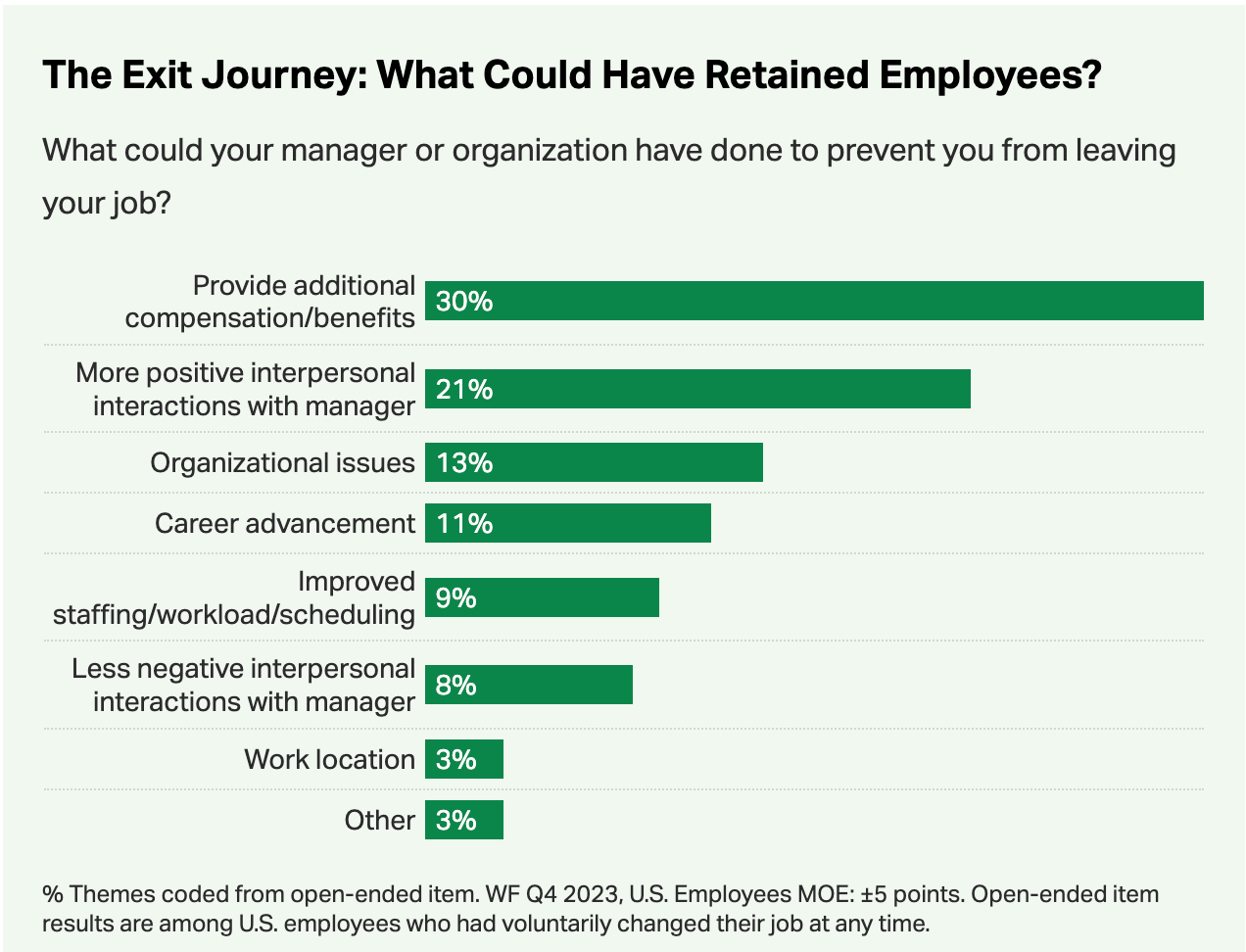
Compensation-related dissatisfaction, not just low pay but confusion, perceived inequity, and a sense that the process isn't fair, is consistently among the top reasons US employees voluntarily leave. Replacing even one mid-level employee costs a significant multiple of their salary. Multiplied across annual attrition, that number gets large quickly.
What are the three ROI categories for compensation planning software?
Compensation planning software creates measurable value in three categories: time saved during merit cycles by comp managers, HRBPs, and C&B teams, time recovered from reduced employee queries and grievances, and lower replacement costs from reduced voluntary attrition. Each has a clear calculation logic and a research base behind it.
Rather than presenting a single ROI number and asking you to trust it, here's how each category of value is built and what the research says about each one.
Merit cycle efficiency
The hours your compensation managers, HRBPs, and C&B team spend running annual or biannual merit cycles, managing spreadsheets, tracking approvals, correcting errors, producing reports, converted into a dollar value using their loaded hourly cost.
Salary alone understates the real cost of an hour of HR time. When you factor in benefits, payroll taxes, and overhead, as the BLS does in its Employer Costs for Employee Compensation data, the true cost per hour is meaningfully higher than the base wage. Using loaded costs is how you build a model that holds up.
Reduced employee queries and grievances
Time saved by HRBPs, C&B teams, and sales employees on compensation-related questions, disputes, and appeals, the volume of which drops when pay decisions are visible, explainable, and consistent.
The query burden is underestimated because it's invisible in most time-tracking systems. HRBP time spent explaining a merit decision or walking a manager through a pay band isn't logged as compensation administration. It just disappears into a catch-all. For sales teams on incentive plans, plan opacity is the primary driver of commission disputes. Visibility fixes most of them.
"When organizations educate employees on how their pay is determined, trust increases by 10% and pay equity perceptions improve by 11%." - Tony Guadagni, senior principal in the Gartner HR practice
Reduced voluntary attrition
The replacement cost avoided when voluntary turnover decreases, even modestly, as a result of transparent salary bands and clearer pay communication.
Replacing an employee costs anywhere from 40% of annual salary for frontline roles to 200% for managers. A 1 to 2% point reduction in voluntary attrition across a mid-size workforce adds up to a number that dwarfs the cost of the software.
Peer-reviewed research in the Academy of Management Journal confirms that when employees believe pay is unfairly distributed, pay secrecy amplifies attrition. When they believe it's fair, secrecy has far less impact. The model uses a 1 to 2% attrition reduction because it's conservative. The research supports larger effects, but in a business case, conservative assumptions are your best friend.
| Without dedicated software | With dedicated software | |
|---|---|---|
| Merit cycles | 5 to 8 weeks, spreadsheet-based | Shorter, more accurate, auditable |
| Employee pay questions | Handled ad hoc by HRBPs/C&B | Answered via self-service or TRS |
| Pay band clarity | Inconsistently applied | Structured, visible, explainable |
| Attrition risk | Elevated by pay confusion | Reduced through transparency |
What should you exclude from a compensation software ROI calculation?
A credible ROI model excludes benefits that can't be reliably quantified, not because they're unreal, but because including unverifiable numbers undermines the business case. Revenue impact from better incentive design, legal risk reduction, and legacy platform cost savings are real upsides but belong in the footnotes, not the headline.
Revenue lift from better incentive design
Companies with well-designed sales compensation plans outperform those with opaque, complex ones in measurable ways. But attributing revenue growth to compensation software requires a controlled experiment most companies can't run. Mention it as directional upside, keep it out of the headline number.
Legal and compliance risk
Pay equity settlements at major US employers have run into the hundreds of millions of dollars in recent years. Documenting your compensation decisions, band rationale, merit distribution, SIP payout consistency, is your first line of defense. But expected legal cost avoidance is too speculative to anchor a CFO conversation.
Overpayment reduction
When salary bands are enforced by software rather than tracked informally, overpayments against band tend to decline. Include it if you have the data. Exclude it if you don't.
Legacy platform savings
These vary too much by organization to generalize. Don't build your case around them.
How does Compport calculate compensation software ROI?
Compport's ROI calculator uses five inputs:
- Company name
- Industry
- Technology maturity
- Number of employees
To model time savings across merit cycles, query and grievance reduction, and attrition-related cost recovery. The output is a conservative range, not a single number, built on data from 300+ customer implementations.
The calculator asks five questions. It uses industry benchmarks, BLS salary data, and maturity-adjusted lift rates to model what changes when you move from spreadsheets and manual workflows to a structured compensation platform.
The output is a ROI range across three benefit categories, shown as annual value and cumulative five-year value, with a built-in ramp-up that reflects real adoption patterns.

Want to walk through your results with someone?
We'll show you what the calculator output looks like applied to your specific company and current tech setup.
Book a demo →FAQs
What's a realistic ROI for compensation planning software?
Based on Forrester's Total Economic Impact studies of comparable HR platforms, ROI in the 200–360% range over three to five years is typical for mid-market organizations. Compport's model projects 208–269% over five years, at the conservative end of that range.
How long before we see results?
Time savings during merit cycles show up within the first full cycle after go-live, usually within three to six months. Attrition benefits take longer: twelve to twenty-four months is a realistic window for turnover metrics to reflect improved pay transparency and salary band clarity.
What inputs do I need to run the model?
Number of employees, industry, approximate HR team size, voluntary attrition rate, and your current technology maturity. The last one matters because a company still running fully manual processes recovers more hours from automation than one that's already partially automated.
Does pay transparency actually reduce attrition?
Consistently, yes. Research across tens of thousands of employees finds that workers at high-transparency organizations are significantly less likely to leave than those at low-transparency ones, and the driver is perceived fairness of the process, not just the pay level itself. Peer-reviewed studies in the Academy of Management Journal and the Strategic Management Journal confirm the effect.
Is revenue impact included in the ROI model?
No — and deliberately so. Revenue lift from better incentive design is real, but attribution is too complex to verify in most organizations. The three buckets in the model (cycle efficiency, query reduction, attrition) are what you can defend in a business case. Revenue upside is the bonus.
%20(91).png)

%20(90).png)